
This article provides some important recommendations for maintaining privacy for LearnWorlds School Launch.
Maintaining privacy during your LearnWorlds School’s building process guarantees that your users see only what you want them to. This helps create a polished first impression, manage expectations, and prevent incomplete or sensitive information prematurely.
- How to disable the registration process.
- How to stop search indexing.
- How to create a temporary landing page.
- How to incorporate a prelaunch section.
- Additional tips such as hiding the top bar and creating a “coming soon” popup.
Disable the Sign-Up process
a. Go to Website → Website Settings → Authentication → LearnWorlds.
b. Click on No one can sign up. I will add my users manually under the Sign-up process.

Users can be added manually via your LearnWorlds School’s admin panel. Learn more in our respective article about LearnWorlds School Launch.
Pause/Stop the Search Indexing of your School
a. Navigate to Website → Design → Edit website → Custom Code and add the following, under <head> logged in (html) and under <head> logged out (html):
<meta name=”robots” content=”noindex,nofollow”>
b. Click on Update and save your desired changes.

To omit specific pages from sitemap, follow the instructions in our respective article.
Use a Temporary Home Page
Using a temporary home page enables you to display relevant messages like “Under Construction” or “Coming Soon.” This can assist visitors informed while maintaining privacy. This can fulfill various purposes, including advertising events, conveying important announcements, facilitating maintenance or updates, and responding to emergencies.
Steps to set up a temporary page:
a. Go to Design → Edit Website and navigate to your Pages Manager.
b. Locate your current homepage that has the /pages/home slug.
c. Click on Clone Page to duplicate your homepage.

d. Once the page is duplicated, click Website → Site Navigation.
e. Click on Select another page and choose the page you wish from the dropdown menu.
Click on Save & Close.

Incorporate a Prelaunch Section
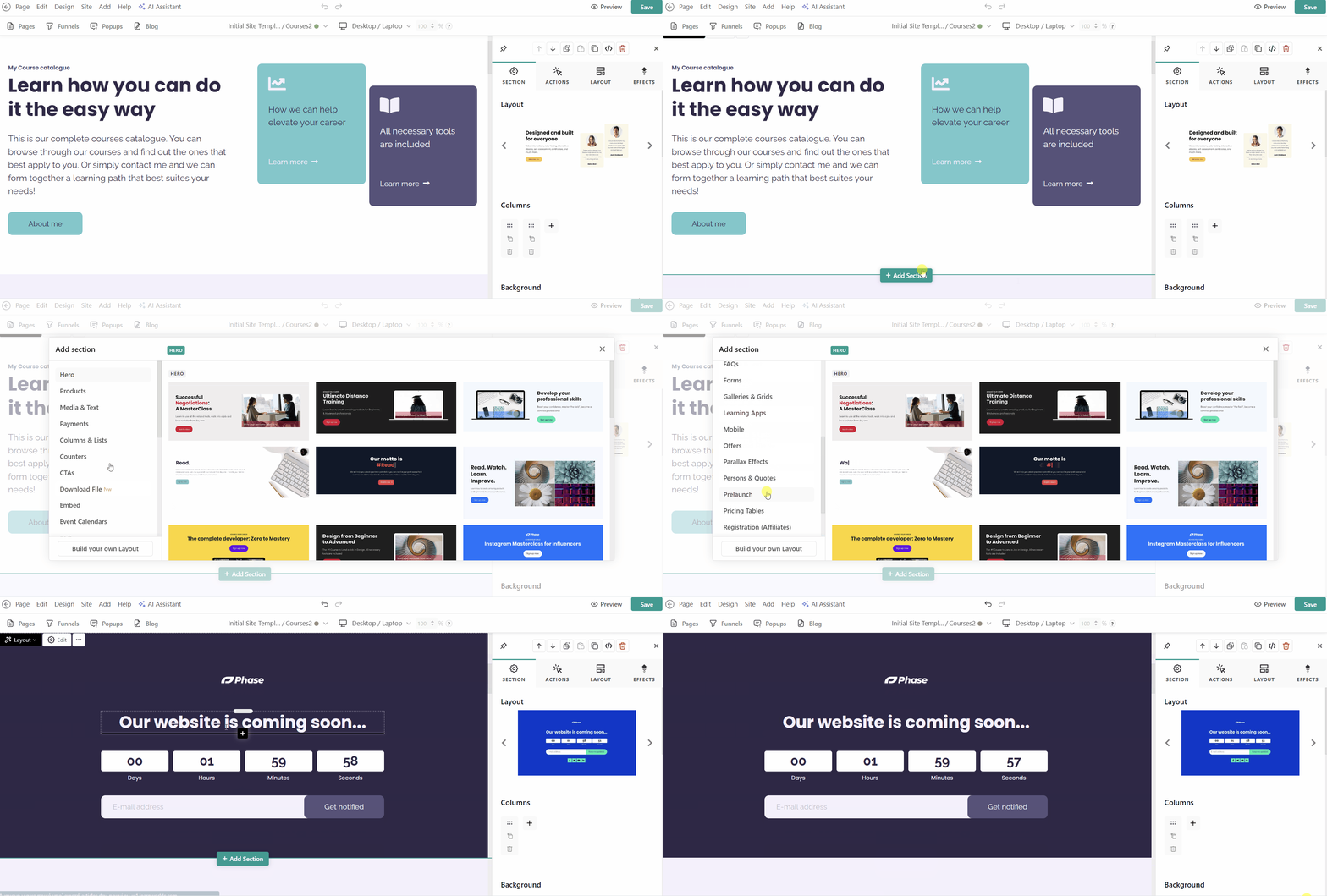
If you wish to inform your users about the upcoming LearnWorlds School Launch of your online class platform, you can add one of our Prelaunch Sections.
a. Go to Website → Design → Edit Website.
b. Choose the page you want to edit from the Pages Manager.
c. Click on the +Add section to add one of our available Prelaunch Sections. Customize your prelaunch section with engaging text and visuals to build anticipation on your LearnWorlds School.
Hide the Top Bar
Removing the top bar ensures visitors focus on your message and not incomplete features.
Navigate to Design → Edit Website → Page → Top bar & Footer and choose the No top bar at all option to hide the top bar across all pages.

Create a “Coming Soon” Popup
Click Website → Design → Edit Website → Popup and create a new one. You can find more details about the popup here.

Preview Your Website as a Visitor
Visit your LearnWorlds School as a logged-out user to ensure your pages appear as desired and that all necessary information is hidden. This is especially important if you plan to create course online, make online courses, or promote a new online class platform.


Comments are closed